
Introduction: More Than Just a Photo
Through the lens, Christmas feels like a moment of reconciliation between light and warmth.
As the year winds down, everything seems to slow. Twinkling lights shimmer in the air, children dash through the warm orange glow, and parents exchange a quiet smile—the air almost tastes like honey. In that moment, the shutter clicks, capturing not just an image, but the feeling and closeness of a family at that very instant.
These photos don’t just stay on social media.
That’s why post-processing Christmas photos isn’t about exaggeration or over-editing—it’s about making images beautiful yet true, enhancing them so they last, so the memories can be cherished
Common Challenges in Christmas Portrait Editing
Christmas portraits aren’t just about “adding some red and green.” They come with real, practical challenges:
1.
Mixed and Unbalanced Lighting
The warm glow of tree lights and candles (warm tones) often clashes with natural window light or cool studio strobes (cool tones). This leads to:
-
"Muddy" or grey skin tones.
-
Inconsistent color temperatures across the frame.
-
Noticeable skin tone differences between family members in the same shot.
2.
Children’s skin
In cold weather, children’s noses and cheeks often become flushed (ruddy), or their skin can look pale and lifeless from the cold. If the retouching is too heavy, you lose that natural texture; if it's left untreated, the skin looks "dirty" or lacks vitality. This is a classic dilemma in children's photography.
3.
High delivery pressure
December is often the most grueling month for photographers:
-
Back-to-back family sessions.
-
Large quantities of images per set.
-
Clients expecting their galleries before the holiday.
Manual retouching alone can quickly lead to fatigue and inconsistent style.
4.
Limited sets but high expectations
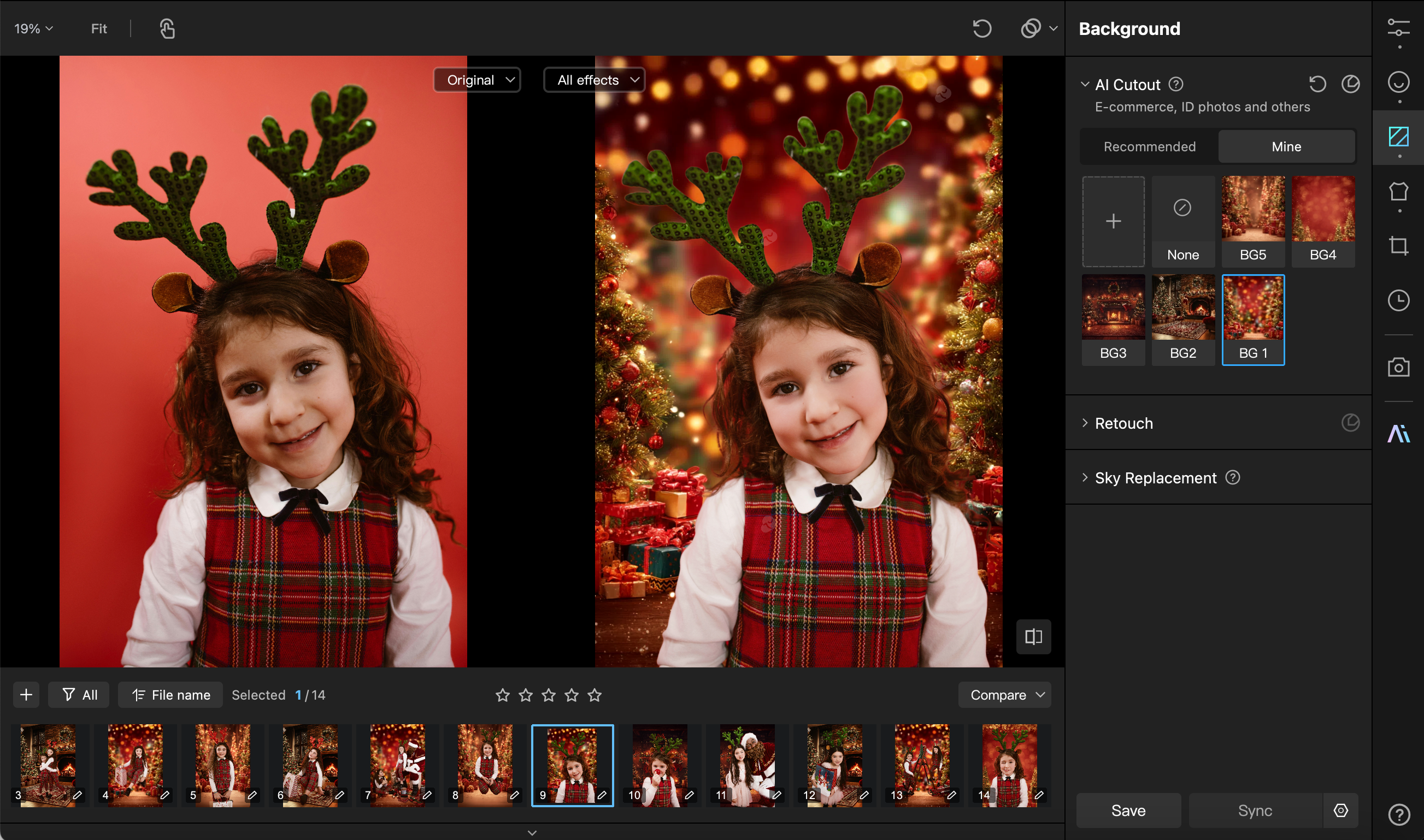
Not every studio has the space for a full fireplace, a snowy window, or an elaborate set. Yet, clients expect "cinematic" holiday vibes. Adding digital backgrounds manually can often look "fake" or amateurish.
These challenges don't necessarily require more complex manual work—they require a smarter way to edit.
A Practical Workflow for Christmas Family & Kids Portraits
1.
Global adjustments: unify the mood
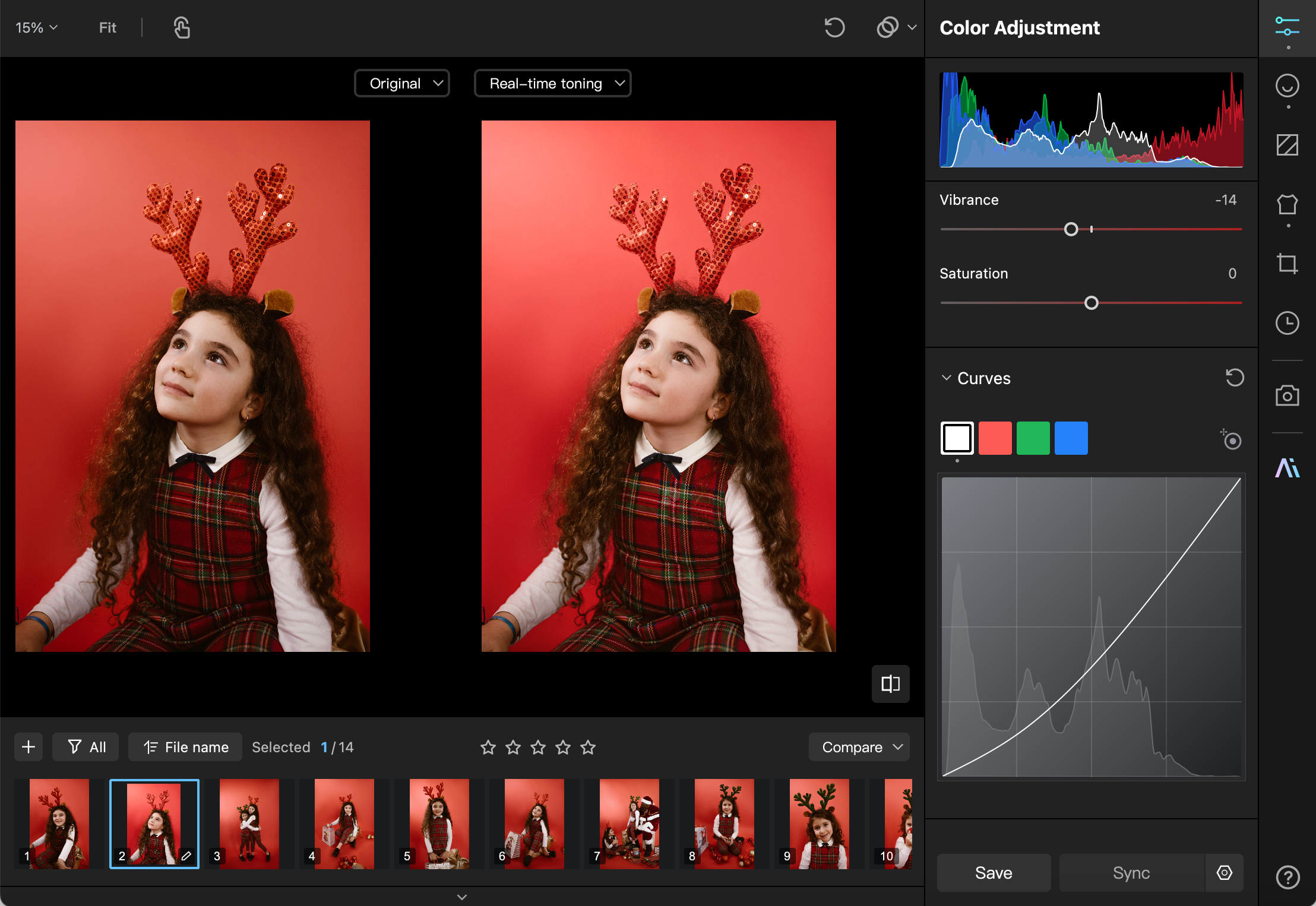
Starting with the RAW files, the first step is to set a solid, stable foundation for portrait retouching. Christmas photos benefit from a slightly warmer white balance to create a cozy feel, but be careful not to overdo it, as excessive yellow tones can make children's skin look sallow.
-
Shadows & Exposure: Slightly lift shadows to ensure textures in knitwear, dresses, and scarves are clearly visible.
-
Highlight Control: Protect the highlights to prevent "blown-out" areas in fairy lights or shiny ornaments.
- Contrast: Maintain enough contrast to give the image depth, avoiding a "flat" or "foggy" look.
2.
Portrait Refinement: For Kids, "Less is More"
There is a golden rule for children's retouching: The lighter the touch, the better the photo. Compared to adults, children's skin is naturally clean and translucent. Over-smoothing or cranking up the saturation will destroy that authenticity.
-
Targeted tone adjustments: subtle blush or lip correction, not global saturation boosts
-
Enhance catchlights: make eyes lively without over-sharpening
-
Preserve skin texture: delicate, not “plastic”
For family or sibling shots, subjects’ skin and expressions often differ.
In my workflow, I leave this step almost entirely to Kumoo. What makes it stand out is its ability to distinguish between Man, Woman, Children, etc. Instead of a "one-size-fits-all" filter, it applies demographic-specific optimizations based on age and skin characteristics.
Using features like Remove Blemishes, Face Reshape, and Makeup, I can refine a subject's appearance without sacrificing the natural skin texture, perfect for families with high expectations.

3.
Enhancing light and atmosphere
The soul of a Christmas photo is often the "feeling of light" rather than the composition itself.
Here, I subtly enhance:
-
The soft glow of Christmas tree lights
-
Gradual natural light from windows
-
Warm candlelight for depth
These subtle adjustments turn “nice” photos into storytelling images.
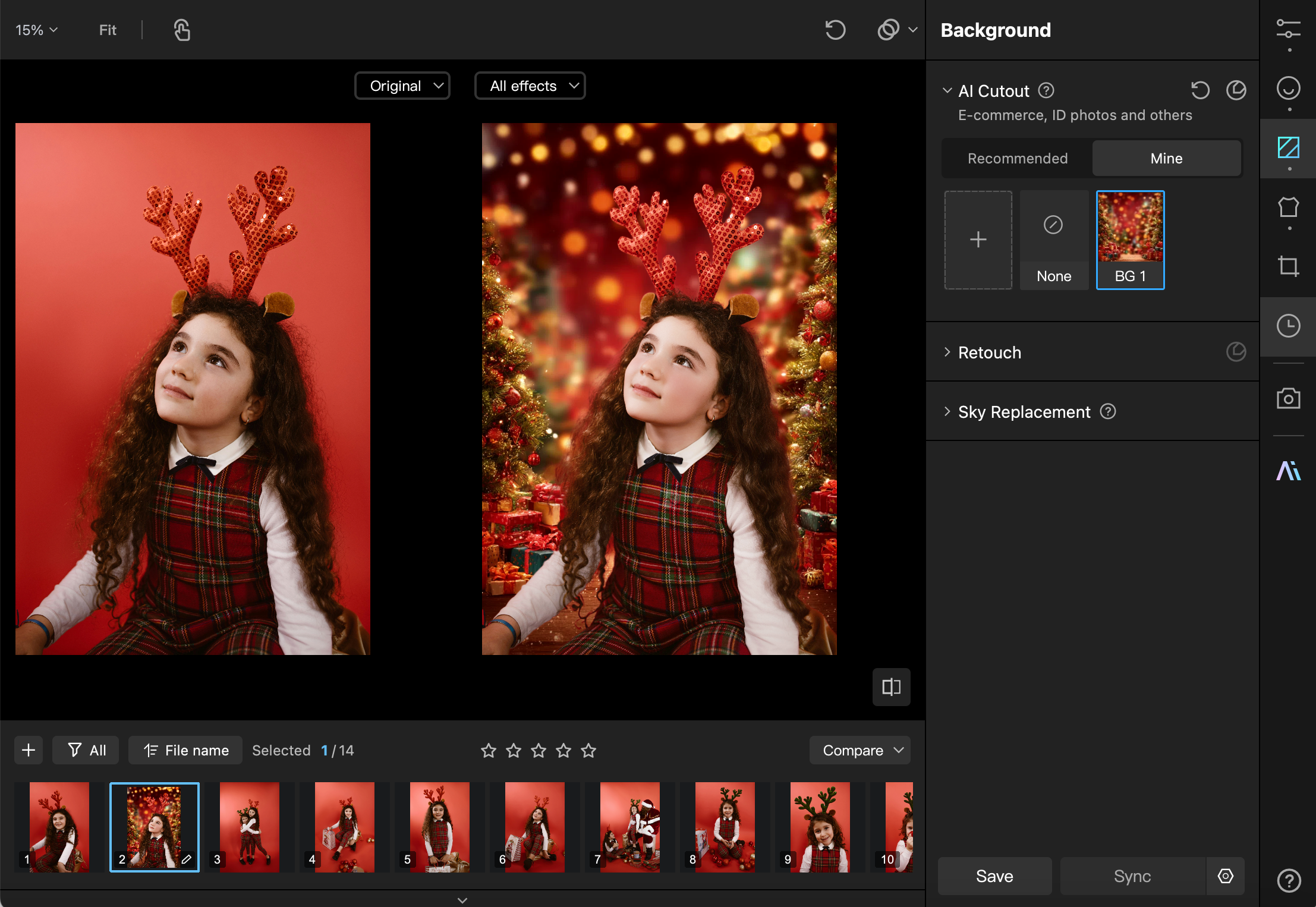
If your studio setup was limited, you can use Kumoo’s AI Cutout feature. It allows for one-click precision masking to replace a plain background with a festive scene. The AI ensures clean edges and natural lighting integration, which is a highly practical way to increase the commercial value of your work while keeping costs low.
4.
Save presets & batch editing: key for peak season efficiency
When facing a massive queue of images, my habit is:
-
Save current parameters as a dedicated "Christmas Preset."
-
Show clients different "styles" (e.g., Warm Gold vs. Bright White) during the selection phase.
- Fine-tune key parameters for each family, then batch apply them to the entire set.
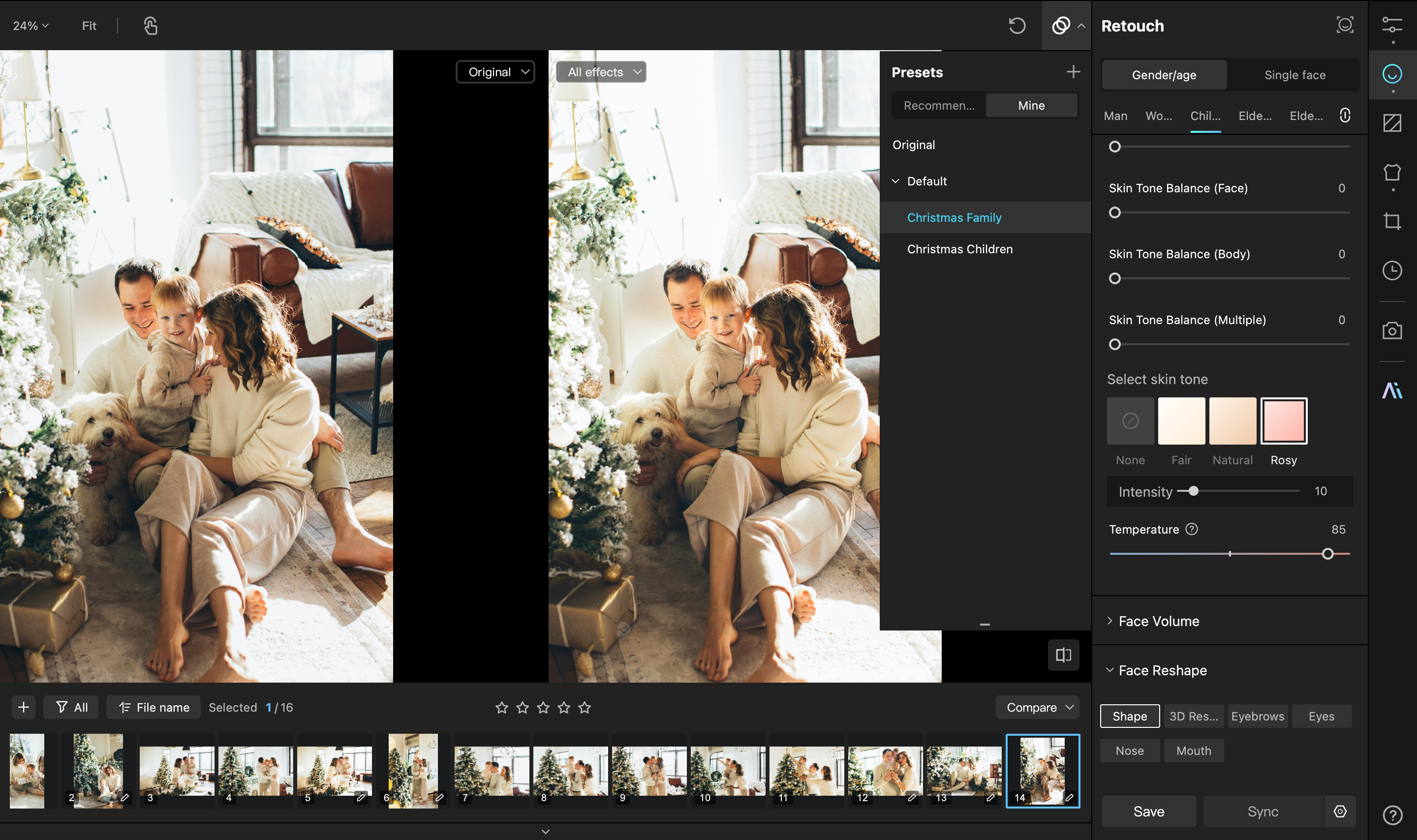
Batch editing solves more than just the time issue; it ensures stylistic consistency. It guarantees that the entire gallery feels like a cohesive story.
Additionally, Kumoo’s Tethered Shooting support is a game-changer. Adjusting styles in real-time during the shoot means what the client sees on the screen is almost the finished product. This drastically reduces post-production revisions and significantly improves the on-site client experience.
Conclusion
When the shoot ends, the noise fades, and the studio is quiet, I’m often alone, meticulously refining pixels in front of the screen. Outside, families gather; inside, I craft their memories.
Thankfully, post-processing doesn’t have to be a solo struggle. Kumoo acts as a silent partner, taking over repetitive tasks, letting every photo retain its true memory, and letting me close my laptop earlier.
When the final image is uploaded, I step outside, coat on, under the moonlight, arriving home before the fireplace dies out—ready to join the family I just helped capture in light and warmth.

Ready to elevate your Christmas photography? Explore Kumoo AI and start transforming your portraits today!